Showing posts with label Scripting. Show all posts

Saturday, July 4, 2009

Design: Small Details and Scripting Tales

I'm afraid I don't have any new screenshots to show off, as lately my work on the module has been polishing up some area design and doing some scripting. As a programmer, generally I don't find scripting too taxing, but I do sometimes get hit by issues that take quite a while to nut out. This week has raised two such problems.

The first issue came out as a result of me being sick of fighting a horde of orcs/bugbears/giants/generic enemy X who all come at me with exactly the same appearance and weapon. So I decided to implement a relatively simple script to give creatures a random weapon upon spawning. While the logic for doing so was relatively simple, the script didn't work, and the creatures spawned in weaponless. After a lot of testing, I eventually tracked down the problem to the fact that NPCs can't equip a weapon that isn't identified. Frequently, creatures will have an unidentified magical weapon in their weapon hand, which poses no problem. However, if the item is in their inventory, and they have to equip it, then it must be identified before the equip is attempted, otherwise the attempt will fail, just like it would for a PC.

The second issue was a result of my trying to produce some atmosphere for one of my areas. This involved spawning a creature at a random location near the a PC and then making it move. This worked fine... except for that periodically, the game would crash! Such undesirably behaviour had me stumped until I hit upon the realisation that the creature was spawning in a non-walkable area and attempting to move - causing a crash just like a player trying to move in an unbaked area. After hunting around in the toolset, I found the FindSafeLocation function to solve the problem.

The reason I spent so much time fighting these bugs is because I feel it is small aspects like this that makes games special. I want players to have a unique experience while playing this module, and it's these small things that I feel go a long way to providing atmosphere and polish, even if the majority of players don't notice it. I'm reminded of a note in the Readme for Maerduin's Harp & Chrysanthemum, begging players to read at least one item description. I appreciate that dedication, and it's wonderful to see when players enjoy those small things. Trust me, every time a player notices those little details and smiles, the designer gets a real kick out of it.

Monday, August 11, 2008

Toolset Tidbit: Quality Assurance

I've been taking a little time out recently to do a little bit of QA testing and general tweaking of various issues. When I first started Fate of a City, my development was very much "test-as-you-go", in that I'd make changes, go in game, test them out, and then correct as necessary. Now, I've switched to a fairly solid workflow of writing out a quest or a sequence in its entirety before running a playtest, during which time I review the dialogs and scripts, then playtest numerous times trying different options and following different choices (of action and dialog). While I'm finding the latter more efficient at the current time, the former does have its uses depending on circumstances.

Testing-you-go is useful at a few times. For one, if you're doing a complicated script sequence, then it potentially can be better to break up your testing into parts and test each one individually. This is particularly good for multi-part scripts - as you can divide the script up for testing purposes, test each separate part for any bugs, and then once each component works correctly, combine the scripts together for a final test. Make sure you do that final test, as without that, you've got no guarantee you haven't got some weird dependency that can cause strange script behaviour. If you're a beginner scripter, I strongly recommend trying things repeatedly, as if you try and script everything at once and then go in for a final test, you can end up with some really strange behaviour that can be impossible to debug. I must admit, I was guilty over doing too much without scripting before testing when I first started, as coming from a programming background, I was comfortable with my logic - but that doesn't necessarily translate to the nuances of NWN scripting.

Once you're more comfortable with the toolset and scripting and you've got a comfortable workflow, you'll find that you can create rather complex sequences without getting in there and testing first, which can potentially can save you time. But again, if you're finding that something doesn't work, don't be afraid to break it down into something more simple to debug it - or alternatively ask one of the helpful people on the forums or #nwn2-cr for advice on how to fix the problem!

I will share one useful tidbit I've got into the habit of doing for making sure that conversations work properly. Firstly, in most conversations, make sure you have a specific blue node (ie PC line) with the line [End Dialog] to end conversations. The first benefit to this is that it avoids the "[Continue]" text in dialogs that will actually result in the conversation stopping. Small details like this bug me as a player, and while you might call me pedantic, there is a very good reason as a builder that I like doing this, if you'll bear with me. Most "[End Dialog]" nodes will not contain any scripted actions, and indeed I try and avoid them wherever possible - sticking actions on the previous speaker node if I can. In addition, whenever I have a node that ends the conversation, I try and link to a single "[End Dialog]" node within the conversation. All this applies to NWN1 style conversations - for NWN2 style cutscene dialogs simply have two empty nodes to mark the end of a conversation - one blue and one red. A thought I've just had now is that if you really want, you could put "{End Dialog}" as the text of the red node to indicate to you the purpose without displaying anything to the player.

Now I understand you might be asking "Why?". The answer is simple. When you've finished writing your conversation, widen your dialog window so that the "Text" column of the dialog window ends the screen. Now, if everything isn't already expanded, then hit "Expand all" button. At this point, scroll down through your dialog and look for any node that doesn't have a grey line underneath it. Any such line is a potential problem - as it indicates a conversation end. Virtually every line should have a grey line underneath it, either linking to another conversation node, or the "[End Dialog]" node that you created earlier. Obviously there will be some exceptions, for example, if the player ends the dialog e.g. a blue node labelled "Goodbye.", or perhaps a dialog node that results in some other unusual action occuring - e.g. an area transition, the NPC attacking, some type of scripting sequence, etc, etc.

This technique makes debugging conversations far quicker at a cursory level, and avoids any missing links in complex, branching conversations that can easily get out of hand for builders. While it won't solve all your problems, it's definitely something I've found useful.

That aside, I've been working on quality assurance in the graphical/aesthetic department as well, tweaking lighting, texturing, sounds and general decor just to make sure that the atmosphere and visual appearance is achieving the effects that I was originally trying for i.e. - what I have written down in my design document! To that end, I've created another swag of screenshots for people's perusal just to give a big more of an indication of the minor tweaks that I've been working on.


Some of the differences might be minor, and of course, the sound modifications can't be conveyed via screenshots, but rest assured that the variable rain is accompanied by appropriate sounds. Now, if only there was some way to modify exterior lighting via scripting...


Of course, no testing is without annoyances... One such annoyance is using the MotB rest system - in that I've copied the scripts over from MotB for the major module events, yet when I rest in my module, I still get two messages sent to the player indicating the rest has been started and canceled when the rest window pops up. If anyone has experienced the same behaviour (or even if they haven't!), then I'd love to hear from you. I really would, and doubly so if you have an idea of what's going on! :-)

Thursday, July 10, 2008

Toolset Tidbit: PC-Less Screenshots

It's time for few more screenshots today, most of which are showing off a new area I finished this evening. While many of the areas haven't been the most well-to-do of locations thus far, the house interior that features in four of these screenshots is most definitely home to some wealthy people.

You'll also note that in a couple of screenshots, I have no player visible, as in this screenshot below!

I am sure some of you may have known how to do this already, but I only discovered how to do it today. Even better is that it is really simple! All you need is a single line script to accomplish it:
SetCreatureAppearanceType(GetFirstPC(), APPEARANCE_TYPE_INVISIBLE_HUMAN_MALE);
You can also make it so you can toggle the invisible state on and off, but this plays havoc with the PC's movement rate for some reason, so I'd advise against it.

I named my script a very descriptive "z_hide". All I need to do to use it, is to go into the game, bring up the console with the ~ key, type in "debugmode 1" (without quotes) to enable debugmode (amazing, huh?). This lets you run scripts by using "rs ". So simply typing "rs z_hide" will allow me to make the PC invisible and take screenshots freely!

I imagine this would work beautifully for taking screenshots for custom load screens...

Also if you haven't already done so - check out the trailer in my previous post, and vote in my poll!

Monday, June 23, 2008

Scripting: Roster Companions and Sitting NPCs

I know I said I wasn't going to be working on Fate of a City for two weeks, but I've managed to steal some time in my hectic schedule (no, it's not a holiday, unfortunately) to work on a few things, from tweaks and bugfixes to NPC verisimilitude.

Little things being the operative word here, but I must admit, I do get a small of a kick out making those little touches that add a little bit of extra class. To that end, I've done some minor fiddling with the visual effects editor, which although didn't result in massive production, it has at least made one encounter a little bit nicer.

Two bugfixes were in regards to the handling of roster companions. In numerous generic scripts I've written, it is only the main PC who should be affected or interact with a specific object. I discovered that my previous solution to this problem was actually a little flaky, and unfortunately I was forced to resort to using GetFirstPC(), which basically ends any notion I had of trying to support cooperative multiplayer in Fate of a City.

The second bugfix, and this is rather a big flaw, I feel, is that the default ga_take_item does not function as it should when the item is in a rostered companion's inventory - namely gc_check_item return true, yet ga_take_item will not remove the object! Obviously, this is very significant if you have rostered companions, so I coded up a replacement version to deal with that instead.

// ga_take_item
/*
This takes an item from a player
sItemTag = This is the string name of the item's tag
nQuantity = The number of items (default is 1). -1 is all of the Player's items of that tag.
bAllPartyMembers = If set to 1 it gives the item to all PCs in party (MP only)
*/
// FAB 9/30
// MDiekmann 4/9/07 -- using GetFirst and NextFactionMember() instead of GetFirst and NextPC(), changed nAllPCs to bAllPartyMembers
// AmstradHero 22/06/08 -- Recoded it to go through Roster members instead of faction members

#include "nw_i0_plot"

void main(string sItemTag, int nQuantity, int bAllPartyMembers)
{

int nTotalItem;
object oPC = (GetPCSpeaker()==OBJECT_INVALID?OBJECT_SELF:GetPCSpeaker());
object oTarg;
object oItem; // Items in inventory

if ( nQuantity == 0 ) nQuantity = 1;

if ( bAllPartyMembers == 0 )
{
if ( nQuantity < 0 ) // Destroy all instances of the item
{
nTotalItem = GetNumItems( oPC,sItemTag );
TakeNumItems( oPC,sItemTag,nTotalItem );
}
else
{
TakeNumItems( oPC,sItemTag,nQuantity );
}
}
else // For companions
{
string sTarg = GetFirstRosterMember();
while ( sTarg != "" )
{
oTarg = GetObjectFromRosterName(sTarg);
if ( nQuantity < 0 ) // Destroy all instances of the item
{
nTotalItem = GetNumItems( oTarg,sItemTag );
TakeNumItems( oTarg,sItemTag,nTotalItem );
}
else
{
TakeNumItems( oTarg,sItemTag,nQuantity );
}
sTarg = GetNextRosterMember();
}
}

}
Note that I've removed the GetFirst/NextFactionMember calls entirely, so this will probably only function correctly if you have rostered companions only. I haven't experimented with all the different methods of adding people to your party, so I can't really comment further. All I know is that this is working for me.

I finally decided to bite the bullet and fiddle with making sitting NPC function in a reasonable manner, which took a bit of effort as I tweaked various things. I realise a lot of people have probably already implemented a similar system, but I thought I'd present mine here. The first was producing a heartbeat script for NPCs to have them sit and then randomly talk occasionally while staying seated.

//b_hb_sit
//Heartbeat script for creatures to simulate sitting and talking occasionally

//Function used to delay the playing of the sitidle animation to avoid "skipping"
void delayIdle()
{
PlayCustomAnimation(OBJECT_SELF, "sitidle", TRUE, 1.0);
}


void main()
{
//Determine if I want to sit randomly or if I want to talk
int nAnim = d2();
if (nAnim == 1)
{
PlayCustomAnimation(OBJECT_SELF, "sitidle", TRUE, 1.0);
}
else
{
//I'm not idling - grab a different animation
//These animations last for 5.33 seconds, hence the delay command to switch it to idle once they're done
nAnim = d3();
switch (nAnim)
{
case 1:
PlayCustomAnimation(OBJECT_SELF, "sitfidget", FALSE, 1.0);
DelayCommand(5.33, delayIdle());
break;

case 2:
PlayCustomAnimation(OBJECT_SELF, "sittalk01", FALSE, 1.0);
DelayCommand(5.33, delayIdle());
break;

case 3:
PlayCustomAnimation(OBJECT_SELF, "sittalk02", FALSE, 1.0);
DelayCommand(5.33, delayIdle());
break;
}

}
}
The delay function is necessary because you can't use DelayCommand() directly on PlayCustomAnimation(), and you want to make sure that you play "sitidle" immediately after any other sit animation finishes because otherwise the NPC may decide to stand up "in" their seat, which looks weird. You also can't loop the other commands because then you get a jump as it switches between them. I also steered away from the "sitdrink" and "siteat" animations because it looks a little silly when people are drink or eating without anything in their hand. If anyone has a good solution to this, I'd love to hear about it.

The second issue was making it so that anyone sitting down would not turn to face the PC when clicked on, which typically makes their legs or some other part of their body magically pass through the seat they are sitting on. To solve this problem, all that is needed is a simple one line script added as an action to each start node of their conversation. (I'm only using barkstrings, but it should work for larger conversations too because I set bLockOrientation to TRUE.)

//ga_stay_face
//Makes an NPC stay facing the same direction rather than turning to face the PC
void main()
{
SetFacing(GetFacing(OBJECT_SELF), TRUE);
}
So with those two scripts, voila! People will happily sit down, occasionally animating to talk to the person opposite, and will not turn to face the player for a conversation.

All that you need to do is to create a seat placeable, make sure it is not static and doesn't have dynamic collisions, and then place the person "inside" the seat. Basically the torso of the character will not move forward from where you place them in the toolset, only their legs will move forward when they go into a sitting pose. Also, if you're using benches (as is often the cases with taverns), you may need to create a walkmesh cutter to prevent PCs from walking through it - or just place more people on the bench! :-) Also make sure that you set your NPC's bump state to un-bumpable.

I'd like to thank weby and GrinningFool from the NWN2 IRC chat server for their help and input on the various issues I was having with some of the scripts I've mentioned.

Finally, congratulations to all the winners of the AME Golden Dragon Awards! They were all well-deserved accolades.

Friday, May 30, 2008

Scripting: Learning to Love the Locals

Time for another couple of scripting tidbits today, but covering something that is an important and extremely useful aspect of scripting and blueprints - Local Variables. I see lots of script examples where values are hardcoded into the script. While this is functional, it is something that I try to avoid, because generally, with a little bit of extra effort, such scripts can be turned into gems that can be reused and save hours of production time.

One great example that ships with the game (and most people would be familiar with) is the SpeakTrigger. Simply paint the trigger, edit the variables to set the correct NPC to speak, whether it's a cutscene, whether they talk immediately or if they have to run to you first, whether it's a one shot or able to be used multiple times, and you're done. You don't have to open up the script and save a new copy each time you want a speak trigger.

It's significantly easier to enter in these variables rather than recoding the script everytime - have you delved inside the gtr_speak_node and the call it makes? Recoding that everytime you wanted a different speak trigger would be fraught with danger (you could break the script by typing in the wrong place) not to mention inefficient. Each separate speak trigger would have its own script that the NWN2 engine would have to load up (small processing overhead) and store (small storage overhead). Sure, a few fractions of a second or kilobytes here or there don't seem like much, they add up. But enough harping on about how great local variables are - let's get on to some examples of WHY!

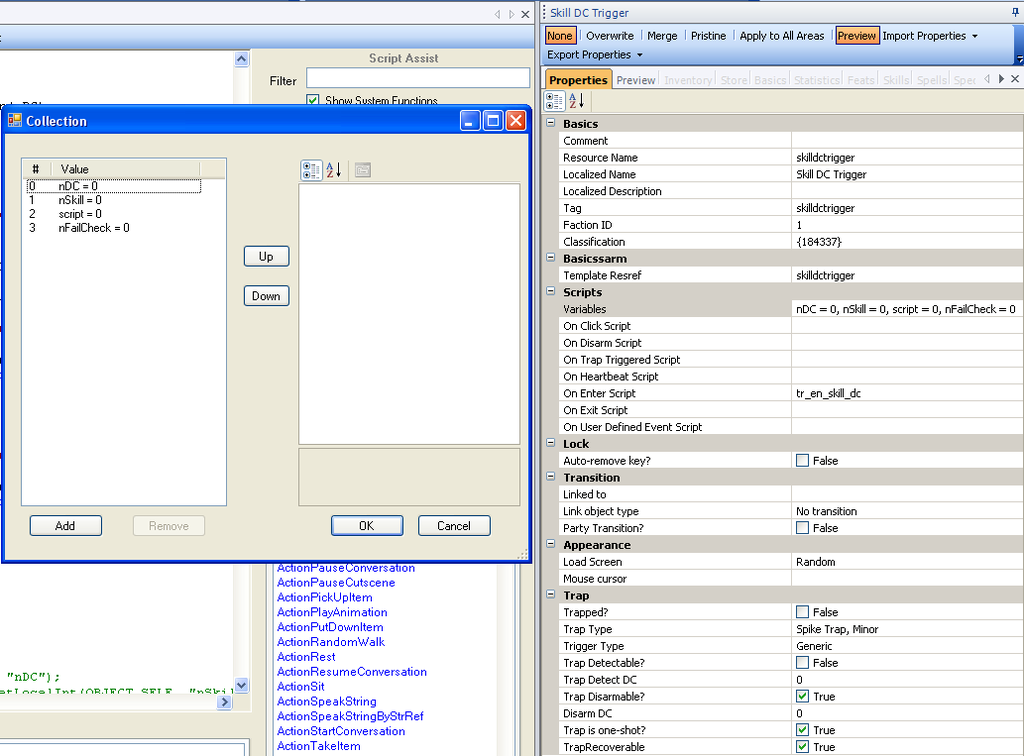
I've got another example that I created for my module that enables the use of skills in an "invisible" fashion. What I wanted was a trigger blueprint that would do a skill DC check on the PC the first time the PC enters the trigger. I want to be able to specify the following things:
* The DC to check against
* The skill that is being test
* A script to run upon "success"
* Whether the script is run when I succeed the check, or when I fail the check

So my blueprint looks like this:


Now, while I'm espousing the qualities of local variable to cut down on scripting, you'll notice that I've I'm running another script when the test "succeeds". So you might argue I'm not saving much in terms of scripting, but the bonus is that I don't have to duplicate my skill dc check code everytime I want a new skill dc trigger.

Basically, I yanked the code from the gc_skill_dc script and modified for use on a trigger. The code looks like so:

// tr_en_skill_dc
/*
NOTE: You *MUST* use a unique tag for every object that uses this script.
Will do a skill DC test for the PC *ONCE ONLY*
The parameters below should be set as the variables of the object.
If the check succedes, the script will execute the script specified by the "script" variable on the object.

ALTERNATIVELY:
It is possible to set "nFailCheck" to 1, and then the script will execute if the PC FAILS the check

Multiplayer note: It also may be desirable to give the option to only fire once - ie destroy self afterwards.

Parameters:
int nDC = dc check value
int nSkill = skill int to check
string script = script to run upon "success"
int nFailCheck = whether to run the check on passing or failing the check
0 = run the script if the check succeeds (default)
1 = run the script if the check fails

Remarks:
skill ints
0 APPRAISE
1 BLUFF
2 CONCENTRATION
3 CRAFT ALCHEMY
4 CRAFT ARMOR
5 CRAFT WEAPON
6 DIPLOMACY
7 DISABLE DEVICE
8 DISCIPLINE
9 HEAL
10 HIDE
11 INTIMIDATE
12 LISTEN
13 LORE
14 MOVE SILENTLY
15 OPEN LOCK
16 PARRY
17 PERFORM
18 RIDE
19 SEARCH
20 CRAFT TRAP
21 SLEIGHT OF HAND
22 SPELL CRAFT
23 SPOT
24 SURVIVAL
25 TAUNT
26 TUMBLE
27 USE MAGIC DEVICE
*/
// BMA-OEI 9/02/05
//AmstradHero - 16/05/08 : Modified to deal with multiple PCs and companions

#include "ginc_param_const"

void main()
{
object oPC = GetEnteringObject();
if(!GetIsPC(oPC))
return;

int nDC = GetLocalInt(OBJECT_SELF, "nDC");
int nSkillVal = GetSkillConstant(GetLocalInt(OBJECT_SELF, "nSkill"));

object oOwner;
if (GetIsOwnedByPlayer(oPC))
{
oOwner = GetControlledCharacter(oPC);
}
else
{
oOwner = oPC;
}

int nDoOnce = GetLocalInt(oOwner, "DO_ONCE" + ObjectToString(OBJECT_SELF)); // a unique do-once
if(nDoOnce == 1)
return;
SetLocalInt(oOwner, "DO_ONCE" + ObjectToString(OBJECT_SELF), 1);
SetLocalObject(OBJECT_SELF, "oActivator", oOwner);

if (GetIsSkillSuccessful(oPC, nSkillVal, nDC) == TRUE)
{
if (GetLocalInt(OBJECT_SELF, "nFailCheck") != 1)
{
string script = GetLocalString(OBJECT_SELF, "script");
ExecuteScript(script, OBJECT_SELF);
}
}
else
{
if (GetLocalInt(OBJECT_SELF, "nFailCheck") == 1)
{
string script = GetLocalString(OBJECT_SELF, "script");
ExecuteScript(script, OBJECT_SELF);
}
}
}
I've included all the comments from the original script with a few additions - that way I can easily open up the script to remind me which value corresponds to which skill. Also, please note the point at the top where it says every trigger must have a unique tag - if you don't, then running over one tag will result in another tag not reacting the first time you run over it.

Two interesting things from this script. Firstly, it only operates on a party leader, and only takes their skill into consideration. That's what the oOwner logic is doing - making sure that any companion is ignored for the purposes of the skill check. It wouldn't be too hard to add in another local variable that would allow you to take advantage of companion skills as well, and then add the appropriate logic in for that. (If anyone is particularly interested in this script, I could code up and post a modified version that would allow just that.)

The second is that you'll also note that I've got a SetLocalObject call that stores the PC (oOwner) as an object on the trigger. This is to allow future access of the PC (if required) for any script that is activated by this trigger.

With those things in mind, using this trigger is practically complete. All you need to do is paint the trigger, fill in the relevant variables and then code up the secondary script. I've found it a useful way to code up little encounters and skill checks.

If you want something a little more specific, then I made a modified version of the above that performs a "tracking" test on the PC, and can get the PC to comment based on whether they have succeed the check or not.

// tr_en_track
/*
Description:

Modified version of tr_en_skill_rank.
Checks search and Survival to determine success and displays floating text on success.

NOTE: You *MUST* use a unique tag for every object that uses this script.
Will do a skill rank test for the PC *ONCE ONLY*
The parameters below should be set as the variables of the object.
If the check succedes, the script will execute the script specified by the "script" variable on the object.

Multiplayer note: It also may be desirable to give the option to only fire once - ie destroy self afterwards.

Parameters:
int nRank = minimum rank to return TRUE
string sText = text to display as floating yellow text if check is successful
string sFail = text to display (if any) upon failure
int xpReward = amount of XP to give to the player as a reward for succeeding the check

Checks Search and Survival to determine success

*/
//AmstradHero - 16/05/08 : Modified to cope with multiple PCs and companions

#include "ginc_param_const"

void main()
{
object oPC = GetEnteringObject();
if(!GetIsPC(oPC))
return;

int nRank = GetLocalInt(OBJECT_SELF, "nRank");

object oOwner;
if (GetIsOwnedByPlayer(oPC))
{
oOwner = GetControlledCharacter(oPC);
}
else
{
oOwner = oPC;
}

int nDoOnce = GetLocalInt(oOwner, "DO_ONCE" + ObjectToString(OBJECT_SELF)); // a unique do-once
if(nDoOnce == 1)
return;
SetLocalInt(oOwner, "DO_ONCE" + ObjectToString(OBJECT_SELF), 1);

if ( (GetSkillRank(19, oOwner) >= nRank) || (GetSkillRank(24, oOwner) >= nRank) )
{
string sText = GetLocalString(OBJECT_SELF, "sText");
AssignCommand(oOwner, SpeakString(sText));
GiveXPToCreature(oPC, GetLocalInt(OBJECT_SELF, "xpReward"));
}
else
{
string sText = GetLocalString(OBJECT_SELF, "sFail");
if (sText != "")
{
AssignCommand(oOwner, SpeakString(sText));
}
}
}
All you need to do is create a new trigger blueprint, add in the relevant variables to the blueprint (I'd suggest adding a default XP reward value on the blueprint), then attach the script. These are fairly simple scripting examples, but they're useful tools for providing some extra skill checks into a module. Players like their skills and choices to have an effect, so make life easier for yourself by using little scripts like these to make using them a simple affair!

Thursday, May 8, 2008

Scripting: The Little Things

This is just a placeholder post with a quick apology regarding my May 4 post on NPC managing conversations. There was a potential problem in the script as I originally posted it, in that it was possible for the trigger to be incorrectly destroyed! It is now fixed, so please grab it again if you copied it before. My sincere apologies for not noticing earlier!

Today I have three small utility scripts that are handy in various situations. The first two are OnEnter scripts for triggers that you can use to fire off a single line of speech. The first is to get an NPC to speak a line when the PC steps on the trigger. Of course, you could use a speak trigger to do this, but this way there's no need to create a conversation file with a single line, and the trigger destroys itself upon having been fired.

// tr_en_npc1liner
/*
Description:
Makes a specified npc/object speak a line ONCE for each that PC passes over the trigger

Local Trigger Variables:
talkString - the string the chosen NPC should say
npcTag - the exact tag of the NPC to speak the line
*/
//AmstradHero - 01/04/08
void main()
{
object oPC = GetEnteringObject();
if(!GetIsPC(oPC))
return;
//The following has to be done in two lines, otherwise the string is not retrieved properly
string talk = GetLocalString(OBJECT_SELF, "talkString");
AssignCommand(GetObjectByTag(GetLocalString(OBJECT_SELF, "npcTag")), SpeakString(talk));
DestroyObject(OBJECT_SELF);
}

The second is very similar, except displays floating text above the PC instead of having an NPC speak the line. This is handy for where you want to have the PC "hear" or "notice" something as opposed to having an NPC say something.

// tr_en_pc1liner
/*
Description:
Makes each PC that passes over the trigger say the specified line once

Local Trigger Variables:
talkString - the string the chosen NPC should say
*/
//AmstradHero - 01/04/08
void main()
{
object oPC = GetEnteringObject();
if(!GetIsPC(oPC))
return;

FloatingTextStringOnCreature(GetLocalString(OBJECT_SELF, "talkString"), oPC);
DestroyObject(OBJECT_SELF);
}

The last script is designed for use in conversations. It allows you to change the first name, last name, or both names of an object with a specific tag. I feel this is a nice touch that allows you to add names dynamically to NPCs, rather than just having the PC magically know the names of everyone they meet automatically.

// ga_set_object_name
/*
Changes the first and last names of object oTag to the two supplied strings
If no object tag is specified, the change will be applied to OBJECT_SELF

AmstradHero - 08/04/08
*/
void main(string oTag, string sFirstName, string sLastName)
{
object oTarg;
if (oTag == "")
{
oTarg = OBJECT_SELF;
}
else
{
oTarg = GetObjectByTag(oTag);
}

if (sFirstName != "")
{
SetFirstName( oTarg, sFirstName);
}
if (sLastName != "")
{
SetLastName( oTarg, sLastName);
}
}

While these scripts may not look like much, they're just small enhancements to a modding toolkit that helps to improve productivity and to add that special extra touch.

Sunday, May 4, 2008

Toolset Tidbit: Managing Multiple Meetings with NPCs

I've recently decided that I'm going to change the blog style a little from mere progress updates and teasers to offering little fragments of design and tips and tricks that I find help me and improve my work while I'm doing modding. Rest assured that I won't fail to post updates on how the mod is progressing (and you can expect one tomorrow!), but I thought I'd like to offer a bit more information to fellow builders in terms of things that I find useful. If there's enough enthusiasm, I might even end up collating all my useful scripts and blueprints into a prefab module for people to download. On this note, I'll discuss a set of scripts/triggers that I've found useful to have. I'll first describe the scenario, and then the solution.

Scenario
The player has a conversation with an NPC, at the end of which, the NPC leaves the area in which they are talking. The NPC leaves the area and moves to another area in the module, where the player will meet them later. The main issue here is the relevance of the NPC's dialogue - as the NPC's dialogue is different upon meeting them initially, and then changes once they meet the player for the second time.

Possible Solutions
The first option is create a separate blueprint for the NPC. Create a conversation that has the initial conversation as a "show once" starting node, then a sequence of barkstrings as they are leaving, in case the player catches up with them as they are walking/running away. These nodes also need a ga_move script attached so that the NPC keeps moving to its exit destination. Upon the ending node of the initial conversation, have a ga_create_object script call that creates a new instance of this blueprint at the desired location that PC will meet the NPC later, and assign it a new conversation.

The second option is to jump the NPC to a destination location, and use a local variable to keep track of its state. This is particularly handy if you're trying to maintain the state of the NPC in question. What do I mean by this? Imagine your NPC has an item that the PC can pickpocket off him/her. Your blueprint is likely going to have this object as part of its inventory. If the PC pickpockets the NPC the first they meet them, the item is gone, but when you recreate the NPC at the new location using ga_create_object, it will magically have another one of said item. If you jump the NPC, it maintains its state. There are other examples as well, but I think I've illustrated the point.

So, basically, we need a similar sort of dialogue set up, with a ga_move call at the end of the initial conversation and a sequence of barkstrings. However, we need a few extra things. Firstly, we need to create a trigger that will jump the NPC to a new destination when it gets to the exit. So place a trigger around the destination waypoint, and then use the following script for the onEnter action of the trigger.

//tr_en_jump_npc
/*
Description:
Jumps an object (typically an NPC) with a specified tag to a specific waypoint/object when it hits the trigger.

Local Trigger Variables:
sJumper - tag (or a substring in the tag) of the object to jump to the selected waypoint
sJumpDest - tag of the waypoint/object to jump the object to
bMultiUse - If this is set to 0, the trigger will be destroyed after the first use
Set this variable to 1 if you want the trigger to operate on multiple objects with the same tag

AmstradHero - 22/04/08
*/
void main()
{
object oPC = GetEnteringObject();
//Get the string first to avoid any weirdness
string sJump = GetLocalString( OBJECT_SELF, "sJumper");

//Use FindSubString because the StringCompare compare was giving inconsistent results
//Substring also allows us to jump multiple NPCs while also allowing for previous/later granularity in command assignment
if ( FindSubString( sJump, GetTag(oPC) ) != -1 )
{
//Grab the object because we've got the right one
object dest = GetObjectByTag( GetLocalString( OBJECT_SELF, "sJumpDest"));

//Jump it there
AssignCommand( oPC, ClearAllActions());
AssignCommand( oPC, JumpToObject( dest ));
//Now set its rotation to match the waypoint
DelayCommand(4.0f, AssignCommand( oPC, SetFacing( 180.0-GetFacing( dest ) ) ) );

//Destroy the trigger if it's not designed for multiple uses
if (GetLocalInt(OBJECT_SELF, "bMultiUse") == 0)
{
DestroyObject(OBJECT_SELF, 0.5f);
}
}
}

So all you need do is create the relevant variables on the trigger. So for argument's sake, let's say we have a NPC with the tag c_thief, who moves to a waypoint wp_thief_escapes, which when he leaves the current area will jump to a destination wp_thief_hideout in another area within the module. So we have the wp_thief_escapes waypoint inside this trigger, which has the variable sJumper = "c_thief" and sJumpDest = "wp_thief_hideout". Note that you could potentially set nUseMult to 1 if you wanted, but in many cases we don't need it.

So now we are good to go, right? Unfortunately no, because we need to set the NPC to talk differently upon reaching its destination. So switch to the destination area, and create another trigger around the jump destination waypoint that the NPC moves to. So we create a trigger aorund our waypoint wp_thief_hideout. and use the following script for it onEnter.

//tr_en_set_npc_int
/*
Description:
Sets an integer variable on an object (typically an NPC) with a specified tag to a specific value upon entering

Local Trigger Variables:
sNPC - tag (or a substring in the tag) of the object to jump to the selected waypoint
sVarName - name of the variable to set
nValue - value to set the variable to
bMultiUse - If this is set to 0, the trigger will be destroyed after the first use
Set this variable to 1 if you want the trigger to operate on multiple objects with the same tag

AmstradHero - 22/04/08
*/
void main()
{
object oPC = GetEnteringObject();
//Get the string first to avoid any weirdness
string sNPC = GetLocalString( OBJECT_SELF, "sNPC");

//Use FindSubString because the StringCompare compare was giving inconsistent results
//Substring also allows us to jump multiple NPCs while also allowing for previous/later granularity in command assignment
if ( FindSubString( sNPC, GetTag(oPC) ) != -1 )
{
//Grab the object because we've got the right one
SetLocalInt(oPC, GetLocalString(OBJECT_SELF, "sVarName"), GetLocalInt(OBJECT_SELF, "nValue"));

//Destroy the trigger if it's not designed for multiple uses
if (GetLocalInt(OBJECT_SELF, "bMultiUse") == 0)
{
DestroyObject(OBJECT_SELF, 0.5f);
}
}
}

Again, create the relevant variables on the trigger. Where sNPC = "c_thief" and we're going to use sVarName = "talkState" and nVarValue = "1". Now comes the final step of creating our next dialog chain above our old one, with the initial condition of gc_local_int - with the parameters "talkState" and "1". And voila! We now have an NPC that we can move around.

Even better, we can simply repeat the steps in order (increasing the value talkState again) to have the NPC move yet again if desired... As an example, perhaps you are pursuing an enemy through a maze. At different stages during the chase, you have a small exchange, then can deal a small amount of damage to the enemy before they leave. Of course, you want to keep track of any items/abilities the NPC has used and any damage they have taken along the way - and these two triggers/scripts allow you to do that as well as creating a series of taunting conversations at each stage. You could also use either trigger in isolation for various purposes too.

While I've used the second option in some cases where it's not necessary in my module, I like the approach because I've got that consistency option there if I want to use it, and also, I get to keep a single conversation for the same NPC, rather than the first option which means having multiple different conversations used for the "same" NPC (at least it the same one as far as the player is concerned, even though might know better).

I hope that someone finds this a useful tidbit that they might be able to use. Any feedback on it or whether you like the idea of more posts like this would be appreciated!